Recruitment Automation Tools: An Honest Comparison for 2026


Quick answer
Recruitment automation tools handle the repetitive parts of hiring so recruiters can spend their time on judgment. The category spans sourcing, screening, interview scheduling, and communication, and no single tool wins every job. Sourcing tools like Gem, conversational tools like Paradox, and coordination tools like candidate.fyi each solve a different bottleneck. Pick by the task that is actually slowing you down, not by the longest feature list.
A recruiting team of six is handling the same requisition load a team of ten carried three years ago. Applications are up. Headcount is not. So the team buys software, and within a quarter they own five tools that each automate a slice of hiring, none of which talk to each other, and a coordinator who now spends her mornings reconciling them. The problem was never a shortage of automation. It was buying automation before naming the bottleneck.
That is the trap this guide is built to avoid. Recruitment automation is a crowded category, and most comparison lists rank tools as if they compete for the same job. They do not. A sourcing engine and an interview scheduler are not substitutes. Below is an honest map of the category by the job each tool does, what to automate and what to leave alone, how to evaluate a vendor, and where candidate.fyi fits. We include ourselves on merit, in the category we actually serve, and we tell you plainly when another tool is the better fit.
What Is Recruitment Automation?
Featured snippet
Recruitment automation is the use of software to run repetitive, rules-based hiring tasks without manual effort: posting roles, screening applications, scheduling interviews, sending updates, and moving candidates between stages. The goal is not to remove recruiters. It is to hand them back the hours that admin work consumes so they can focus on evaluation and relationships.
Recruitment automation covers any part of hiring that follows a predictable pattern. Screening resumes against must-have criteria is a pattern. Matching a candidate's availability to a panel is a pattern. Sending a confirmation and prep details is a pattern. Deciding whether someone is right for the team is not, and good automation knows the difference. The candidate.fyi 2026 Agentic TA Operations Blueprint found that 88% of talent teams have adopted AI in some form, but only 11 to 14% run production-ready agentic systems. Most of the market is stuck in what the report calls Pilot Purgatory: tools bought, value not yet realized. Naming the bottleneck first is how teams get out of it.
What Should You Automate, and What Should You Leave Alone?
Featured snippet
Automate the high-volume, low-judgment work: interview scheduling, reminders, status updates, initial screening against clear criteria, and interviewer coordination. Keep humans on final decisions, offer conversations, and any moment where a candidate needs to feel heard. The test is simple. If a task rewards speed and consistency, automate it. If it rewards judgment or empathy, protect it.
The strongest returns come from the coordination layer, because that is where recruiter hours quietly disappear. Based on candidate.fyi data across 257,946 coordination signals, availability-based interview scheduling takes 243 minutes of back-and-forth per loop, versus 27 minutes when a candidate self-schedules, a 9x difference. Decline handling is worse: a manual reschedule sits unresolved for roughly 68 hours, against about 21 hours when it is handled autonomously. Automating that work is nearly free of downside, because there is no judgment being replaced, only delay being removed.
The failure mode is automating the wrong layer. Auto-rejecting candidates on brittle keyword rules, or sending communication so templated it reads as a form letter, does measurable harm. Greenhouse research found that 50% of candidates have ghosted an employer, and 24% blame slow or poor communication. Automation should make communication faster and more personal, not more robotic. Automate the calendar. Do not automate the relationship.
How Do You Evaluate a Recruitment Automation Tool?
Featured snippet
Evaluate recruitment automation tools on five things: the specific job they do, how deeply they integrate with your ATS, whether they act autonomously or just assist, how they handle exceptions like declines and reschedules, and total cost against the manual hours they remove. A tool that does not write back to your ATS creates a second system of record, which is a cost, not a saving.
Start with the job to be done, then work through the criteria in order. Integration comes first, because a tool that cannot read and write to Workday, Greenhouse, or your ATS of record forces coordinators to keep two systems in sync by hand, which is the exact work you were trying to remove. Second is the level of autonomy. A tool that drafts a message for a human to send is assistance. A tool that resolves a scheduling conflict end to end is automation. The gap between them is most of the value.
Third is exception handling, because hiring is mostly exceptions. Interviewers decline, candidates go quiet, panels get rebuilt. At a structural 14% reschedule rate, a 23-interview loop generates several reschedules per role, so a tool that handles the happy path but escalates every exception to a human has automated the easy 20% and left the hard 80%. Fourth is cost measured honestly: the candidate.fyi Blueprint puts manual scheduling near $15 per hire against under $1 per hire for agentic coordination, so the comparison that matters is software cost versus recovered hours, not sticker price alone.
What Are the Best Recruitment Automation Tools in 2026?
Featured snippet
The best recruitment automation tools in 2026 fall into four groups by job: sourcing and outreach (Gem, Juicebox), conversational screening and high-volume hiring (Paradox, Humanly), all-in-one ATS automation (Greenhouse, Workable), and interview scheduling and coordination (GoodTime, candidate.fyi). There is no universal winner. The right tool is the one that matches your slowest stage.
Organized by the bottleneck each one addresses, rather than ranked against each other, because they rarely compete for the same job.
Sourcing and outreach. Gem is strong for teams whose constraint is top of funnel: it combines a talent CRM with automated, multi-touch outreach and pipeline analytics, and it fits recruiting teams that live in sourcing. Juicebox focuses on finding hard-to-reach candidates across the open web rather than LinkedIn alone, with automated sequences on top. Choose these if your pipeline is thin and your recruiters spend their days prospecting.
Conversational screening and high-volume hiring. Paradox automates the top of the funnel through a conversational assistant that screens, answers questions, and books first interviews, and it is a fit for high-volume and hourly hiring. Note for diligence: Paradox is owned by Workday, which matters if you want an independent layer or are weighing platform lock-in. Humanly plays a similar role for mid-market teams with conversational screening and scheduling. Choose these if you hire at volume and first-touch speed is the whole game.
All-in-one ATS automation. Greenhouse and Workable build automation into the applicant tracking system itself: workflow rules, templated communication, and scorecards. The advantage is a single system of record. The limit is depth. Native scheduling and coordination inside an ATS tends to be basic, which is why teams on these platforms often add a dedicated coordination layer on top. Choose an all-in-one if you are early and want one system, and expect to specialize later.
Interview scheduling and coordination. This is where the hours hide once sourcing and screening are handled. GoodTime is an established player in interview scheduling and logistics. candidate.fyi is the AI coordination layer we build, covered honestly in the next section. Choose a coordination tool if your recruiters are sourcing fine but your calendar is the bottleneck, which for most scaling enterprise teams it is.
153 Interviews Per Coordinator, Per Week.
The average team manages 38 manually. candidate.fyi's AI coordination layer gives your team 4x the capacity — without adding headcount.
Where Does candidate.fyi Fit?
Featured snippet
candidate.fyi is an AI coordination layer that lives inside your ATS and runs interview scheduling, rescheduling, and candidate communication autonomously. It is built for enterprise teams whose bottleneck is the calendar, not sourcing. fyi, the AI agent, resolves 82% of scheduling sessions without human intervention, which is where its time savings come from.
We build one thing and we build it deep. candidate.fyi is not a sourcing engine or an all-in-one ATS. It is the coordination layer for teams whose recruiters can find candidates but lose days to Calendar Tetris: matching availability, rebuilding panels, chasing declines, and keeping candidates warm. fyi, the AI agent, handles 46% of all scheduling tasks autonomously while candidates self-serve another 26%, which leaves coordinators handling only 28%, the exceptions that genuinely need a person.
The results show up in speed and experience together. Relativity Space cut scheduling time 76%, from 2.8 days to 16.2 hours, within six weeks. Zendesk went from 225 to 445 interviews scheduled per week in a single month. And because it integrates natively with Workday rather than sitting beside it, coordinators are not maintaining a second system. Candidate satisfaction moves in the same direction: automated recruiter screens score 4.63 out of 5, higher than manually coordinated hiring-manager interviews at 4.22. Speed is the new empathy.
Choose candidate.fyi if you are an enterprise team on Workday or a major ATS whose interview coordination is the drag on time to hire. Choose a sourcing or conversational tool first if your bottleneck is earlier in the funnel. Most teams end up running a coordination layer alongside their ATS, because that is where the recoverable hours are. See how the pieces fit in our practical guide to recruiting automation for enterprise TA teams, or book a demo to map it to your workflow.
Can't Our ATS Already Do This?
Featured snippet
Most applicant tracking systems include basic automation: templated emails, workflow rules, and simple self-scheduling links. What they rarely do well is autonomous coordination across panels, real-time decline handling, and personalized candidate communication at scale. The honest answer is that your ATS does the easy 20% of automation and leaves the coordination-heavy 80% to your team.
This is the objection worth taking seriously, because every ATS markets automation and most teams already pay for one. The gap is not features on a slide, it is behavior under load. Native scheduling links work until you need to align a five-person panel across time zones, or an interviewer declines the morning of, or a candidate needs rescheduling without three emails. Those are the moments that consume coordinator time, and they are exactly the exceptions a rules engine escalates rather than resolves. A dedicated coordination layer that writes back to the ATS closes that gap without creating a second system of record. If your ATS genuinely handles your panel complexity and decline volume today, you do not need more. Most enterprise teams find it does not, which is why the coordination layer became its own category.
Frequently Asked Questions
What is the difference between recruitment automation software and an ATS?
An applicant tracking system is the system of record that stores candidates and requisitions. Recruitment automation software runs tasks on top of that record, such as sourcing, screening, scheduling, and communication. Many modern ATS platforms include some automation, but dedicated tools go deeper in a single job. The two work best together, with automation writing results back to the ATS.
Which recruitment automation software is best for enterprise teams?
There is no single best tool, because enterprise teams have different bottlenecks. Teams constrained by sourcing lean on tools like Gem, high-volume hirers lean on conversational tools like Paradox, and teams whose drag is interview coordination lean on a scheduling layer like candidate.fyi. The best choice is the tool that automates your slowest, most manual stage and integrates with your existing ATS.
Can recruiting be fully automated?
No, and it should not be. Automation excels at the repetitive, rules-based parts of hiring: scheduling, reminders, status updates, and initial screening against clear criteria. Final hiring decisions, offer conversations, and moments that require empathy stay with people. The practical goal is to automate the roughly 70 to 80% of hiring that is coordination and admin so recruiters can spend their time on the judgment that only they can provide.
How much time does recruitment automation actually save?
It depends on the stage you automate. In the coordination layer, candidate.fyi data across 257,946 signals shows scheduling drop from 243 minutes of manual back-and-forth to 27 minutes self-scheduled, a 9x improvement, and time to interview fall from 5.9 days to 3.9 days. The candidate.fyi Blueprint also puts scheduling cost near $15 per hire manually against under $1 per hire with agentic coordination.
Does recruitment automation work with Workday?
The best tools integrate directly with Workday and other major applicant tracking systems, reading and writing data so coordinators are not maintaining two systems. candidate.fyi integrates natively with Workday and runs scheduling and coordination inside that workflow. When evaluating any automation tool, confirm the depth of the integration first, because a tool that cannot write back to your ATS creates more manual work than it removes.
The Bottom Line
Recruitment automation is not one purchase, it is a set of decisions about which repetitive work to hand to software and which judgment to protect. The teams that win with it do the unglamorous thing first: they find the stage that is actually slowing them down, then buy the tool built for that job, and they confirm it integrates with their ATS before they sign. Sourcing, screening, and coordination are different problems with different best-in-class answers. If your bottleneck is the calendar, which for most scaling enterprise teams it is, a dedicated coordination layer will return more hours than any feature you could bolt onto your ATS. Book a demo to see how candidate.fyi handles your interview coordination end to end.
More Articles
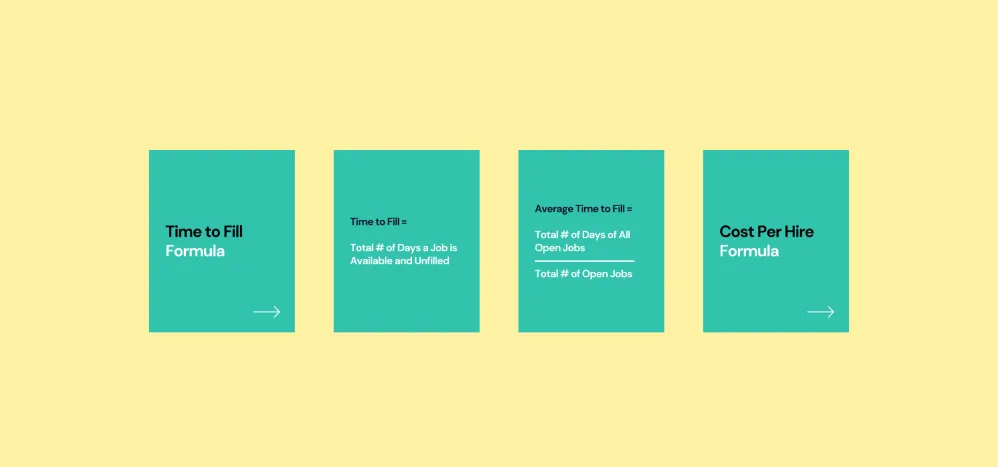
Voices in Talent Acquisition: Mary Strebinger
Got a metric maze? We're here to guide you. Whether you're swimming in data or in dire need of metrics, worry not.
Superdays: What It Actually Takes to Run 40 Interviews in One Day
A superday isn't normal scheduling with more people in it. It's a dependency chain, where every interview's start time is set by the one before it. At a 14% reschedule rate, a 40-interview day carries roughly six rebuilds and 162 hours of coordination behind it.
-p-800%252520(6).webp)
The candidate portal: the newest addition to the tech stack
Discover the transformative impact of the Candidate Portal in our latest blog post. Learn how this tool revolutionizes hiring by providing centralized, real-time access to interview schedules, company info, and more, enhancing candidate engagement and streamlining communication. Find out how seamless integration with ATS and continuous feedback optimization can elevate your recruitment process.